
Ursprünglich veröffentlicht auf LinkedIn am 2025-11-23.
Es ist üblich, dass IT-Administratoren, die klassische Enterprise-Virtual-Machine(VM)-Infrastrukturen verwalten, leistungsstarke, bestehende Tools für Automatisierung und Skalierung übersehen. Während die Vorteile von Cloud-nativen Bereitstellungsmustern — wie verfügbare, selbstkonfigurierende Infrastruktur — gut verstanden werden, erkennen viele nicht, dass ähnliche, Workflow-basierte Effizienz auch für ihre On-Premises-VMs erreichbar ist. Die notwendige Technologie ist seit Jahren verfügbar.
Die effektivste Lösung zur Modernisierung der VM-Bereitstellung besteht in der Übernahme eines zweistufigen Ansatzes:
- Bildvorbereitung: Erstellen standardisierter, minimaler und wiederholbarer VM-Basis-Images mit Packer oder anderen Tools.
- Laufzeitkonfiguration mit Cloud-Init: Bereitstellung und Anpassung dieser Images zur Laufzeit.
Diese Kombination verlagert den Fokus vom manuellen Aufbau und Konfigurieren jeder VM zur Wartung einer zuverlässigen, versionierten Bereitstellungspipeline, was die Infrastruktur deutlich wartbarer und skalierbarer macht.
Ein einfaches Laborumfeld#
Um dies zu testen, verwende ich gerne eine sehr einfache und grundlegende Einrichtung. Ich konzentriere mich in diesem Teil auf cloud-init; die gesamte Bildvorbereitung mit Packer ist ein anderes Thema.
Meine Laborumgebung ist ein tuxedo Infinitybook mit KVM, qemu, libvirt und cloud-init. Wir verwenden ein AlmaLinux Generic Cloud Image als Basis-Image. Dann erstellen wir die benötigten Dateien von Grund auf, um ein Verständnis zu entwickeln.
Benötigte Tools auf der Tuxedo-OS-Workstation für die Entwicklungsumgebung:
sudo apt install qemu-kvm libvirt-daemon-system libvirt-clients bridge-utils virt-manager cloud-utilsDas Paket virt-manager ist optional, es ist eine grafische Oberfläche zur Verwaltung der virtuellen Maschinen.
Mit einem einfachen Bash-Skript kann die Labor-VM gestartet werden:
#!/bin/bash

# Wichtige Shell-Optionen für Robustheit einstellen

# -e: Beenden, wenn ein Befehl mit einem Nicht-Null-Status endet.
#     Dies hilft, Fehler früh in der Skriptausführung zu erkennen.
# -u: Nicht gesetzte Variablen als Fehler behandeln.
#     Dies hilft, unerwartetes Verhalten durch Tippfehler oder fehlende Variablenzuweisungen zu verhindern.
# -f: Pfadnamenserweiterung (Globbing) deaktivieren.
#     Dies kann nützlich sein, wenn Sie Sternchen, Fragezeichen usw. wörtlich behandeln möchten.
# -C: Überschreiben vorhandener Dateien durch Umleitung (mit >) verhindern.
#     Zum Überschreiben müssen Sie >| verwenden. Dies hilft, versehentlichen Datenverlust zu vermeiden.
# -o pipefail: Wenn ein Befehl in einer Pipeline fehlschlägt, ist der Exit-Status der gesamten Pipeline der des fehlgeschlagenen Befehls.
#     Ohne diese Option wäre der Exit-Status der Pipeline der des letzten Befehls in der Pipeline.
set -eufCo pipefail

SSH_PUB_KEY=$(cat $HOME/.ssh/id_ed25519.pub)

# HINWEIS: Laborverzeichnis vorbereiten
if [[ -d $HOME/lab/one1 ]]; then
  cd $HOME/lab/one1
else
  mkdir -p $HOME/lab/one1
  cd $HOME/lab/one1
fi

# HINWEIS: AlmaLinux-10-GenericCloud-Image abrufen
if [[ -a $HOME/Downloads/AlmaLinux-10-GenericCloud-latest.x86_64.qcow2 ]]; then
  : # AlmaLinux 10 GenericCloud-Image ist bereits in Downloads, nichts tun
else
  curl -o ~/Downloads/AlmaLinux-10-GenericCloud-latest.x86_64.qcow2 https://repo.almalinux.org/almalinux/10/cloud/x86_64_v2/images/AlmaLinux-10-GenericCloud-latest.x86_64_v2.qcow2
fi

# HINWEIS: Image für VM vorbereiten
if [[ -a one1.qcow2 ]]; then
  : # Image bereits erstellt, nichts tun
else
  qemu-img create -f qcow2 -o backing_file=~/Downloads/AlmaLinux-10-GenericCloud-latest.x86_64.qcow2,backing_fmt=qcow2 one1.qcow2 25G
fi


if [[ -a user-data ]]; then
  : # user-data existiert; nichts tun
else
cat >user-data <<EOF
#cloud-config
hostname: one1
fqdn: one1.qemu.internal
manage_etc_hosts: true
users:
  - name: admin
    ssh-authorized-keys:
      - $SSH_PUB_KEY
    sudo: ['ALL=(ALL) NOPASSWD:ALL']
    groups: sudo
    shell: /bin/bash
package_update: true
packages:
  - qemu-guest-agent
  - curl
runcmd:
  - dnf config-manager --set-enabled crb
  - dnf install -y epel-release
  - curl -Lo /var/tmp/minione https://github.com/OpenNebula/minione/releases/download/v7.0.1/minione
  - chmod +x /var/tmp/minione
  - sudo /var/tmp/minione --yes
EOF
fi

if [[ -a meta-data ]]; then
  : # meta-data existiert; nichts tun
else
cat >meta-data <<EOF
hostname: one1
fqdn: one1.qemu.internal
EOF
fi

if [[ -a network-config ]]; then
  : # network-config existiert; nichts tun
else
cat >network-config <<EOF
#network-config
network:
  version: 1
  config:
    - type: physical
      name: eth0
      subnets:
        - type: static
          address: 192.168.122.51/24
          gateway: 192.168.122.1
          dns_nameservers:
            - 192.168.122.1
            - 86.54.11.1
EOF
fi

# HINWEIS: VM initialisieren
sudo virt-install \
--name one1-lab \
--ram 2048 \
--vcpus 2 \
--disk path=one1.qcow2,format=qcow2 \
--network network=default \
--os-variant almalinux10 \
--graphics spice \
--import \
--cloud-init user-data=user-data,meta-data=meta-data,network-config=network-config
Wenn virt-install gestartet wird, wird es mit der Domäne ‘one1-lab’ verbunden. Falls jemand nicht daran gewöhnt ist, die Konsole durch virsh geöffnet zu lassen: Das Escape-Zeichen ist ^] (Strg + ]). Eine andere mögliche Lösung ist die Verwendung einer ISO-Datei und deren Einbindung bei der Initialisierung der VM.
cloud-localds one1-cloud-init.iso user-data meta-data -N network-config
sudo virt-install \
--name one1-lab \
--ram 2048 \
--vcpus 2 \
--disk path=one1.qcow2,format=qcow2 \
--network network=default \
--os-variant almalinux9 \
--graphics spice \
--import \
--cdrom one1-cloud-init.iso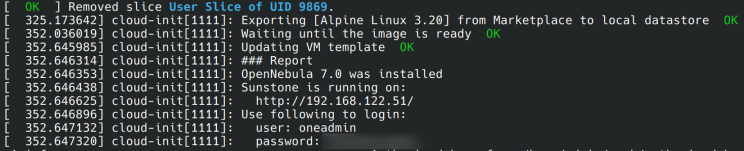
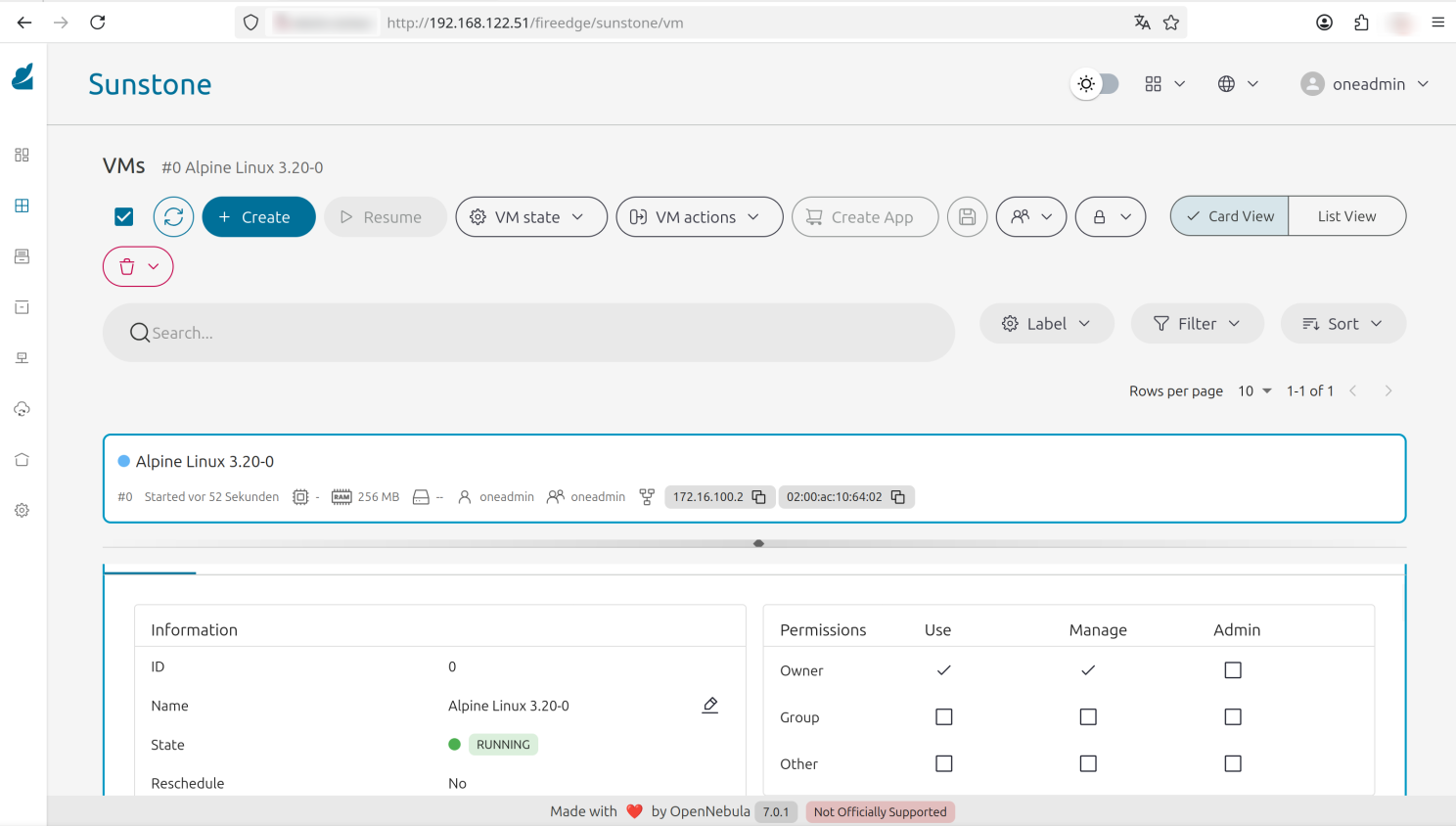
Ein Login auf der VM am Host-System, erstellt durch cloud-init; SSH ohne Passwort kann verwendet werden. Dafür wurde der öffentliche SSH-Schlüssel über die user-data hinzugefügt.
ssh-keygen -f ~/.ssh/known_hosts -R '192.168.122.51'
ssh 192.168.122.51 -ladmin
[admin@one1 ~]$ sudo -u oneadmin onevm list
Ich würde solche Installation wie miniONE mit cloud-init nicht empfehlen, aber es zeigt, was cloud-init kann. Es sind keine Tools wie Ansible, Terraform oder andere beteiligt. Nur ein bisschen Bash, miniONE (welches auch in Bash geschrieben ist) und cloud-init. Zum Skalieren würde ich empfehlen, die Images vorzubereiten und Pakete bereits zu installieren. Nur die Konfiguration mit cloud-init zu finalisieren. Die VM ist schneller online, wenn sie bereits vorbereitet ist, und in Setups, in denen VMs zum Skalieren verwendet werden, spart dies auch Bandbreite. Wenn es nur um Compute-Instanz geht, die keine Daten speichern, können nicht-persistente Images auch Speicherplatz sparen.
Während die Unternehmensübernahme weitere Punkte anerkennt — wie Sicherheitshärtung und umfassendes Image-Lebenszyklus-Management — ist das Experimentieren mit Cloud-Init der effektivste Weg, um die Prinzipien hinter großen, automatisierten Cloud-Bereitstellungen zu verstehen, die jeder Enterprise-IT-Admin kennen sollte. Orchestrierungstools wie Proxmox Server Solutions oder OpenNebula Systems haben Cloud-Init seit Jahren integriert, und es ist eine solide Lösung.
Der Übergang von einem grundlegenden Verständnis zu einer vollständigen Unternehmensimplementierung beinhaltet die Anerkennung kritischer Faktoren wie die Durchsetzung von Sicherheitsrichtlinien, robuste Image-Wartung und die Integration in Ihre bestehenden Orchestrierungstools. Dennoch dient das Sammeln praktischer Erfahrungen mit Cloud-Init als grundlegendes Tor zum Verständnis der Mechanismen, die skalierbare, automatisierte Bereitstellungen in der modernen Cloud-Infrastruktur antreiben.
Machen Sie sich mit den Konzepten vertraut, beginnen Sie mit dem Experimentieren mit User Data und beginnen Sie damit, Ihre eigenen automatisierten Images heute zu erstellen.
Viel Spaß im Home Lab!